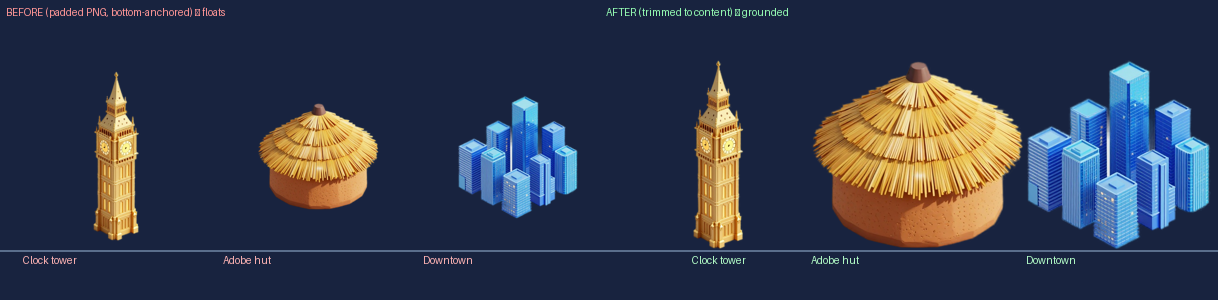
Why my buildings hovered: the step background removal skips
I regenerated 96 building sprites and every one floated above the ground. Not the code, not the shadows — transparent padding the engine faithfully scaled into a cushion of dead air. Here's the mechanism, and the one-line fix for any AI-cut sprite.
I redid the art for the whole game. Six worlds, fresh isometric building renders. Opened the map viewer to admire my work, and the whole city had collectively decided gravity was optional. Ninety-six buildings, every one hovering a few pixels off the ground — and looking a touch undersized, which somehow made it worse. They floated by different amounts too, so a row of them read like a ransom note someone kerned with their feet.
Blaming the obvious thing
The game draws a little shadow ellipse under each prop, a contact patch so things look grounded — and a shadow under a floating object is a special kind of broken. So the first instinct, mine and everyone’s: kill the shadow.
But that’s painting over the smoke alarm. The buildings would still float; they’d just float without a shadow narcing on them. I wanted the cause.
Measuring instead of guessing
So I stopped staring and measured. The sprites are 768 pixels tall. Where does each building’s artwork actually end — where’s the bottom edge of the real pixels, before the transparent nothing begins?
- Europe building: 119px of empty space below it. 15%.
- Africa house: 159px. 21%.
- Space building: 90px. 12%.
And the one set that didn’t float, generated in an earlier batch:
- Earth building: zero. Perfect.
Every floating set carried a fat margin of transparent pixels underneath the building. The set that sat perfectly had none. Same render style, same cutout tool — the only difference was that empty space. That’s not a vibe anymore. That’s a number, and the number is the bug.
Why empty pixels make a building fly
Here’s the part worth internalizing, because it’s true of any engine, not just mine: a sprite is positioned by its frame, not by its visible pixels. The engine doesn’t know where the building “really” ends. It knows the bounding box you handed it.
I cut my art out with an AI background remover — hand it an image, it segments the subject, wipes everything else. The catch is what “everything else” means: it deletes the background color but keeps the frame size. My building was rendered floating in the middle of a 768px square, so the cutout is the building plus a halo of transparent nothing exactly where the grey used to be. A cutout, not a sprite.
Then the engine places it. It bottom-anchors the sprite — origin at the frame’s bottom-center, pinned to the tile — and scales the whole frame to a fixed display height. Whole frame. Including the nothing. So:
- the transparent bottom margin scales up right alongside the art and becomes a cushion of dead air between the building and the ground → it floats;
- everything that isn’t padding is now a smaller fraction of that fixed height → the building reads undersized;
- each asset has a different margin → each floats by a different amount.
Floating, shrunk, and inconsistent — three symptoms, one cause. The ransom-note kerning, explained. And the reason Earth was fine: those PNGs had been trimmed in an earlier pass, so their frame was the building. The bounding box told the truth.
One line
The fix is the step the cutter never does: trim each image to its content bounds. Find the tight box of non-transparent pixels, crop to it, save — now the building’s real base is the frame’s bottom edge, and bottom-anchoring lands it on the tile at full size. One getbbox() and crop in Pillow; magick -trim does the same. I ran it over the pile: 96 trimmed, 16 already tight — Earth’s, of course. The set that worked was the spec for every set that didn’t.
There’s a corollary worth keeping: this only bites bottom-anchored sprites. The HUD icons, anchored dead-center, never cared about their padding — symmetric margin around a centered origin cancels out. It’s the anchoring that turns dead pixels into a visible offset. Know where your engine grabs a sprite and you know which assets this will ambush.
With the buildings genuinely on the floor, I deleted the contact shadow after all — once a thing actually sits on the ground, the fake shadow reads as litter. The honest fix made the patch unnecessary.
Then the one move that mattered more than the 96 files: I wrote trim-to-content into the asset pipeline as a mandatory step after background removal. Trimming the files fixes today. Fixing the recipe fixes every batch I haven’t made yet.
What I’ll remember
- Background removal gives you a cutout, not a sprite. It strips the color, keeps the frame. Anything bottom-anchored will float on the leftover margin.
- A sprite is placed by its bounding box, not its pixels. The engine scales and anchors the whole frame; transparent padding is real estate it faithfully positions against.
- Measure before you fix. “The art looks off” is useless. “4–21% dead padding, and the good one has zero” tells you exactly what to do.
- The thing that works is the spec. Earth’s set wasn’t luck, it was the answer key. Diff against your known-good and the bug confesses.
- Don’t fix the symptom you noticed first. The shadow was loud; the padding was the cause. Killing the shadow ships 96 still-floating buildings, quietly.
- Fix the pipeline, not just the files. A one-line rule in the recipe beats trimming PNGs by hand, forever.
The best part: nothing was wrong with my art, my code, or my shadows. The bug was a few hundred pixels of pure nothing, scaled up until I could see it.