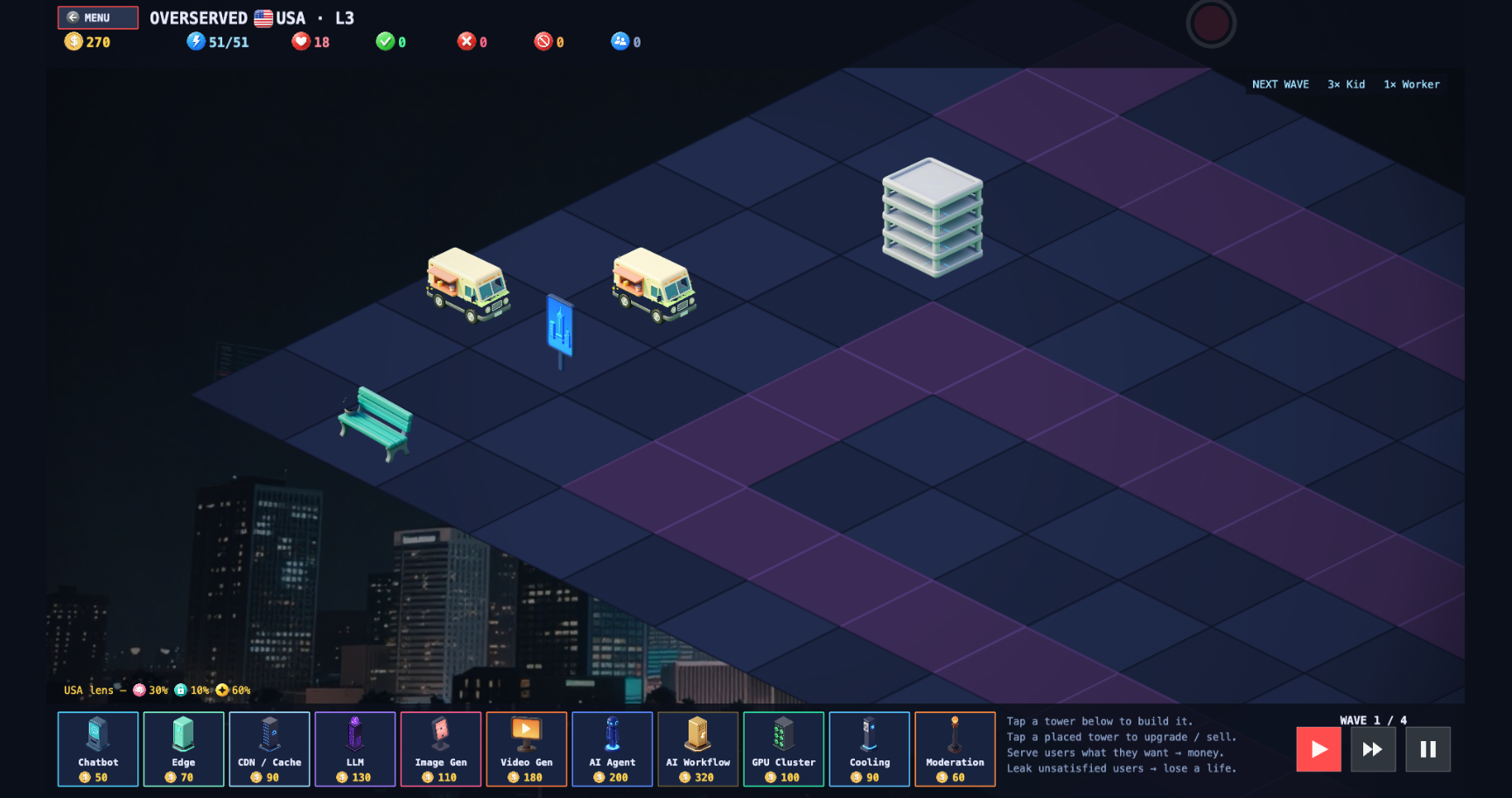
My HUD shrank to half-width and ate its own clicks
Pinning UI 'in place' fixes its position, not its scale. On a zoomed game camera that's the gap between a working toolbar and one that renders at half size and misses every click. Here's the mechanism, and the pattern that actually fixes it.
The board in Overserved is a big isometric diamond, so the camera zooms out to fit it — somewhere between 0.48 and 0.95 depending on the level. The board is fine with that. The HUD was not.
The HUD is the stuff that should never move: the resource bar up top, the build palette along the bottom. I’d pinned it the standard way — the engine flag that says “don’t move with the camera.” It stayed put and rendered at half width, a full-width bar shrunk in from both edges. And every click landed off-target: the button I was looking at and the button I actually hit had stopped agreeing.
Position isn’t scale
The flag I’d trusted — Phaser’s setScrollFactor(0) — does exactly one thing: it removes the camera’s
scroll from an object, so panning the world doesn’t drag the UI around. It does nothing about zoom.
The camera still multiplies every object, “fixed” or not, by its zoom before drawing. Pin the position,
keep the scale. At zoom 1 those are indistinguishable, which is why it had looked correct for months —
the board camera had simply never left 1.0 until I added zoom-to-fit.
The missed clicks were the same bug seen from the other side, and this is the part worth internalizing: rendering and input are two separate transforms, and only one of them was wrong. Phaser converts your cursor to world coordinates using the camera’s full transform — zoom included — so the hitboxes were computed at the correct zoomed scale. The HUD was being drawn as if zoom didn’t apply. Two different answers to “where is this button,” so the picture and the hitbox drifted apart the moment the camera zoomed out. Nothing threw an error, because nothing was technically broken — two systems just disagreed.
The fix is a second camera, not a counter-hack
The tempting fix is to fight the zoom by hand: scale each HUD element up by 1/zoom, reposition it, redo the hit-test at the new scale. That works right up until you add the next HUD element, which needs the same hack, and the one after that. You’d be hand-undoing a transform the engine will keep re-applying forever.
The clean answer is to stop sharing a camera. A Phaser scene can run more than one:
- The main camera zooms to fit the board, exactly as before.
- A second UI camera, locked at zoom 1, draws only the HUD.
The board can shrink to whatever a level needs; the HUD lives on a camera that never zooms, so it spans edge to edge every time. This isn’t a Phaser trick — it’s the standard move for any engine that zooms its world: a dedicated, un-zoomed UI layer. The lesson is to reach for it the moment your camera leaves 1.0, instead of after you’ve hand-scaled twenty widgets.
The tax: every object has to pick a camera
Two cameras pointed at one scene means both try to draw everything, so by default every object renders twice — once zoomed, once not — ghosting across the screen. The cure is to make each object ignored by exactly one camera: the world camera ignores the HUD, the UI camera ignores the board.
The part that actually bites is timing. Objects that exist when you split the cameras get assigned once, automatically. Anything spawned after — a popup dialog, a floating icon over a tower, a hit effect — does not, and silently double-renders until you tag it onto its camera. That single detail became the number-one source of rendering bugs in the project: every new piece of world VFX and every new HUD overlay has to opt into the right camera or it misbehaves, and a forgotten one is an invisible ghost you’ll hunt for twenty minutes.
There’s also a consequence the usual “just use two cameras” advice skips. Input goes manual. Once
the HUD lives on its own camera, you can’t just scatter clickable objects across the split and trust the
engine to resolve hits — the two transforms make “which camera owns this click” ambiguous. So HUD input
becomes deliberate: I hit-test the toolbar and palette myself against raw screen coordinates, and route
board clicks through the main camera’s getWorldPoint to get back into world space. The second camera
fixed the rendering and quietly handed me responsibility for input.
What stuck
- “Fixed UI” means fixed position, not fixed scale. If your game camera ever leaves zoom 1, a pinned HUD scales with it — and the clicks miss, because hit-testing still respects the zoom even when your drawing forgot to.
- Reach for a dedicated UI camera early. One camera zooms the world, one draws the UI at zoom 1. It’s what zooming games do; per-object scale correction is a treadmill.
- Budget for the discipline, not just the fix. Every object belongs to exactly one camera — especially the ones born after the split — and your HUD input probably becomes manual hit-testing. The fix is an afternoon; the habit is permanent.