I re-cut 150 assets to fix 11
A shiny AI cutter fixed my ugliest sprites in one shot, so I pointed it at the whole game. Here's why a color-flood cutter shatters some subjects and AI segmentation saves them — and why only 11 of 150 actually needed the swap.
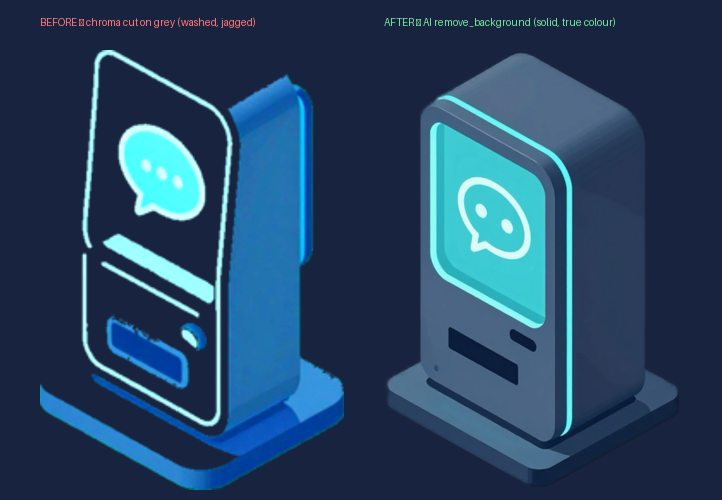
My towers always looked a little wrong. Washed-out bodies, glowy jagged edges — like someone traced a neon outline of the device and forgot to draw the device. I knew roughly why, ignored it for weeks, then fixed the whole set before my coffee went cold with a new tool. Then I kept going. That part cost me a day.
The one set that never cut clean
Most of my art is rendered against a saturated key color, then sliced out by a cutter that floods in from the image border and erases anything matching that color — a chroma key, basically. Fast, boring, reliable. It works because there’s a hard color gap between subject and background: every pixel is clearly “keep” or “kill.”
The towers broke that. They’re rendered on a flat grey studio backdrop — no key color to grab. Point a color-flood cutter at grey and it has no gap to find. A teal chatbot body, a metallic GPU shell, all sit a short color-hop from the grey behind them, so the flood bleeds into the subject: it chews the body toward near-white and leaves the glowing rim where it gave up. That’s the failure mode of every threshold cutter — it only knows color distance, not “is this the thing.” Grey backgrounds have no safe distance to threshold on.
The new tool was AI background removal — a segmentation model (isnet-general-use, run
with alpha matting on) that ignores color entirely. Instead of asking “what matches the
background,” it asks “what’s the subject,” and mattes a soft edge around it. I ran one
tower through. Night and day: solid body, clean edge, true color. Three seconds.
So I fixed all of them. Four still had their grey source files — straight re-cut. The other seven had no saved original, so I regenerated each from its design and cut those, saving the new sources this time. Eleven towers, suddenly looking like one game.
The part where I got greedy
I had a magic wand. Why stop at towers? I pointed it at everything — characters, bosses, projectiles, the whole icon set, every scenery prop. ~138 assets, one blanket pass. I was already drafting the “AI changed my asset pipeline” post in my head.
It died on arrival.
Projectiles and icons came back pixel-identical. Of course — they were cut clean the first time on a proper key. The AI redid a finished job and reached the same answer. Characters were marginally cleaner; a wash. And the scenery got worse.
How “better” went backwards
Some props were rendered standing on a little green ground-plate. Months back I’d written a color-distance pass that spots that plate and deletes it so the prop floats clean on the board. Solved, shipped, forgotten.
The segmentation model doesn’t know that history — and here’s the catch nobody warns you about: an AI cutter keeps whatever the subject is attached to. A prop on a plate reads as one object, so it dutifully handed back every ground-plate I’d already stripped. The smart cutter undid hand-tuned work precisely because it was smart enough to see the plate as part of the thing.
So I bolted the green-plate killer back on. Which ate the leaves off my three green plants — a leaf is also green, and a script that hunts green has no opinion about acacia trees. Hand-carved an exception for those. Final tally: ~150 assets re-cut to genuinely fix 11.
What it actually taught me
I wanted the lesson to be “AI cutting is better.” It isn’t. The real rule is dumber and travels further: match the cutter to the background. A color-flood key wins on art made on a flat saturated key — it’s often sharper than the AI’s matte, with no soft fringe. AI segmentation wins on grey or photographic renders where there’s no color gap to exploit. Neither is universally better; the whole skill is reading which case you’re in before you press go.
A wrinkle I’ve since leaned into: the AI cutter prefers a neutral grey backdrop, not a vivid one. A saturated background bleeds a faint colored fringe into the matte, and see-through gaps in a subject (a slatted bench) leak the background straight through. So the move that actually stuck wasn’t “AI on everything” — it was render new art on solid grey, cut with AI; key out the legacy chroma stuff as-is; and never run a blanket pass over a set that’s already clean.
The other one I keep relearning: a new tool begs you to redo everything. One test per category would have told me up front that only the towers had anything to gain. Instead I ran the experiment on all 150 and read the answer off the wreckage. The towers, though — genuinely night and day. I’d do that again in a heartbeat. I’d just stop the second it was done.