I got 4-direction characters out of a flat AI image for two cents each
My game needs every character drawn from four angles. A text-to-image model can't draw the same face twice. So I stopped asking it to draw the same face twice — I made one mesh and pointed a camera at it.
Overserved is isometric. On a diamond grid, a guy walking down-right has to face down-right — otherwise he moonwalks into battle and it looks broken. So every character needs four sprites, one per facing: southeast, southwest, northeast, northwest. Four.
I generate my art with a text-to-image model running on my own box. Free, fast, great. With one fatal flaw for this job: there’s no shared anchor between calls. Each generation samples from noise independently — the model has no memory of the last image and no concept that two prompts describe the same object. Ask it for “the same businessman, facing left,” then “facing right,” and you get two different men. The scale drifts. The face changes. The suit grows a pocket. Four calls, four strangers. Useless as a turn-set.
Fighting the model
I tried to bully it into cooperating.
One image, four panels. “Same character, four views, single image.” This kept the identity locked — same guy in all four, because they share one canvas — but the model only ever drew him at eye level. Straight-on portraits. I needed the tilted, looking-down isometric angle, and it refused every time. Dead end.
One iso angle, then mirror it. A single front-facing hero looks great. Mirror it and you get the left/right pair for free. But a mirror can only flip what’s already on screen — it can’t show you someone’s back. Two of my four facings were physically impossible. Dead end.
That’s when it clicked: I was asking a 2D model to be consistent in 3D. Consistency across viewpoints is a property of geometry, and a text-to-image model has no geometry — just a 2D guess per call. It can’t give me that. So stop asking.
Get the 3D once, then it’s camera work
Here’s the whole pipeline:
- Generate one hero. A single front-three-quarter portrait on a flat background. One call. Free.
- Cut the background out. I use AI segmentation that finds the subject regardless of colour — important, because a colour-key cut shatters when a teal hoodie sits on a green screen.
- Turn the flat image into a 3D mesh. The one paid step: an image-to-3D model (TRELLIS, on Replicate). It infers depth and wraps the visible pixels onto geometry — about 17 to 20 seconds, and two to three cents per character, measured off the actual GPU time. That’s the entire budget.
- Bake the four angles. I load the mesh into a tiny three.js page in a headless
browser, point a true dimetric camera at it — orthographic, tilted to the
atan(0.5) ≈ 26.57°elevation a 2:1 iso grid wants — and rotate the mesh to each facing. The four directions are just four yaw values. Screenshot each one. Free and unlimited. - Install. Crop the four PNGs to one shared frame so they line up, drop them in, and the game picks the right sprite from the unit’s travel direction.
One flat image in. Four consistent, perfectly-matched isometric sprites out. For two cents.
And because step 4 is just a camera orbiting a mesh, I’m not capped at four. The same meshes will hand me walk-cycle frames later for nothing — eight facings, in-betweens, whatever. The expensive step is the one you do once; everything downstream of the geometry is free. That’s the reusable shape of this: pay once to lift your asset into a representation that’s cheap to re-query, then query it forever.
The white robot that broke everything
Every pipeline has one input that humbles it. Mine was the Singularity — a boss that’s a sleek, all-white robot.
Image-to-3D works by reading surface cues — shading, edges, texture — to guess the shape it can’t see. Hand it a featureless white blob and there’s nothing to read, so it doesn’t fail loudly. It invents. It kept reconstructing my pristine robot as white-and-black, painting dark material onto the back and the occluded folds it had to guess at. Garbage, confidently.
I tried re-lighting it. No good: the mesh’s actual surface colour was black, and lighting multiplies what’s there — no amount of it turns black paint white. I tried a different image-to-3D model. It returned a clean mesh but stripped the colour, and a flat-grey robot recoloured white reads dead.
The fix wasn’t a better tool. It was a better robot. I redesigned the Singularity with deliberate contrast — white chrome plates, dark charcoal panels, a glowing cyan seam. Suddenly the model had real edges to grab. It came out crisp from every angle. Image-to-3D doesn’t need a pretty subject, it needs a legible one. Give it nothing to grip and it fills the gaps with whatever the prior suggests — usually wrong.
What I walked away with
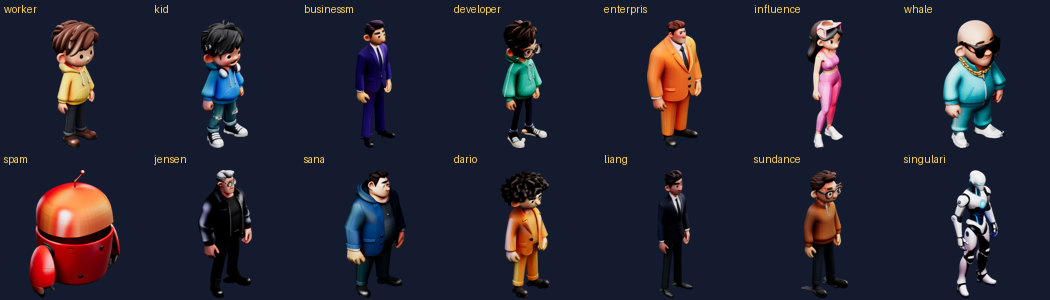
A full cast of 14 characters — workers, kids, businessmen, the bosses, the robot — each baked to four clean directions. Total spend on meshes for the entire cast: five to eight cents. Everything else was free.
- Don’t ask a 2D model for 3D consistency. It has no geometry to be consistent about. Lift the asset into 3D once, then render angles like a camera operator.
- Image-to-3D grips contrast, not beauty. Featureless subjects come back as invented garbage on every surface it couldn’t see. Charcoal panels and a glow seam fixed in minutes what no tool could.
- You can’t re-light bad albedo. If the mesh is black underneath, lighting won’t save it.
- The cheapest step is the one you do once. Pay for the geometry, get every angle — and every future animation frame — for free.
The lesson under all of it: when a tool fights you, check whether you’re holding it wrong before you file a bug. I wasn’t fighting a broken model. I was asking it a question it was never built to answer.